
Google Calendar Masterclass 🗓️
Learn how to set up your Google Calendar for a peacefully productive life
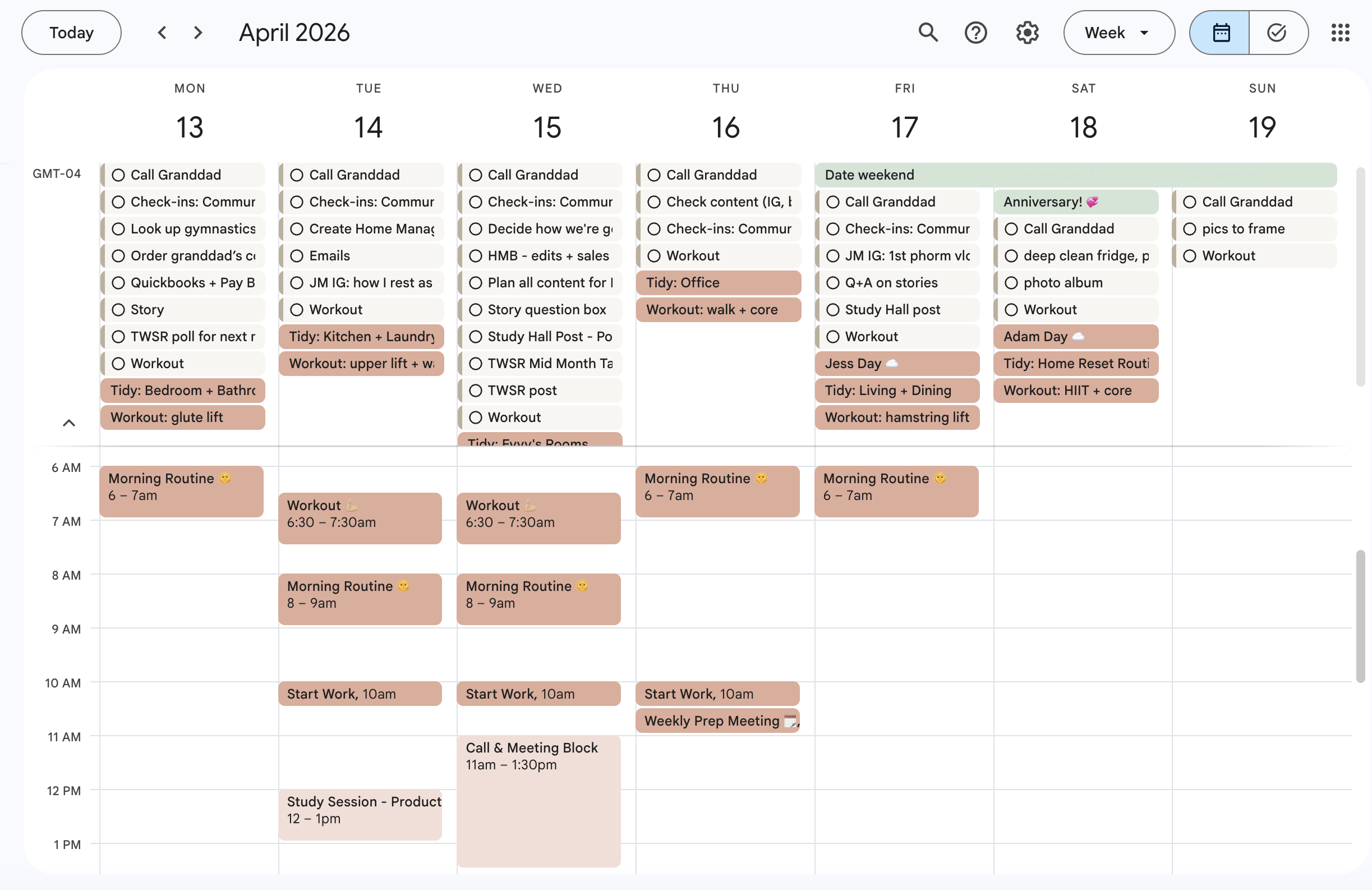
This masterclass walks you through exactly how I use Google Calendar to organize my personal and professional tasks/events in one place.
You don’t need a complicated system. You need a simple place to hold your life so your brain can stop trying to do it all. That’s exactly what I’m going to show you how to create using Google Calendar
By the end of this masterclass, you’ll have:
✨ A fully set up, customized Google Calendar (that you can access from your phone or computer)
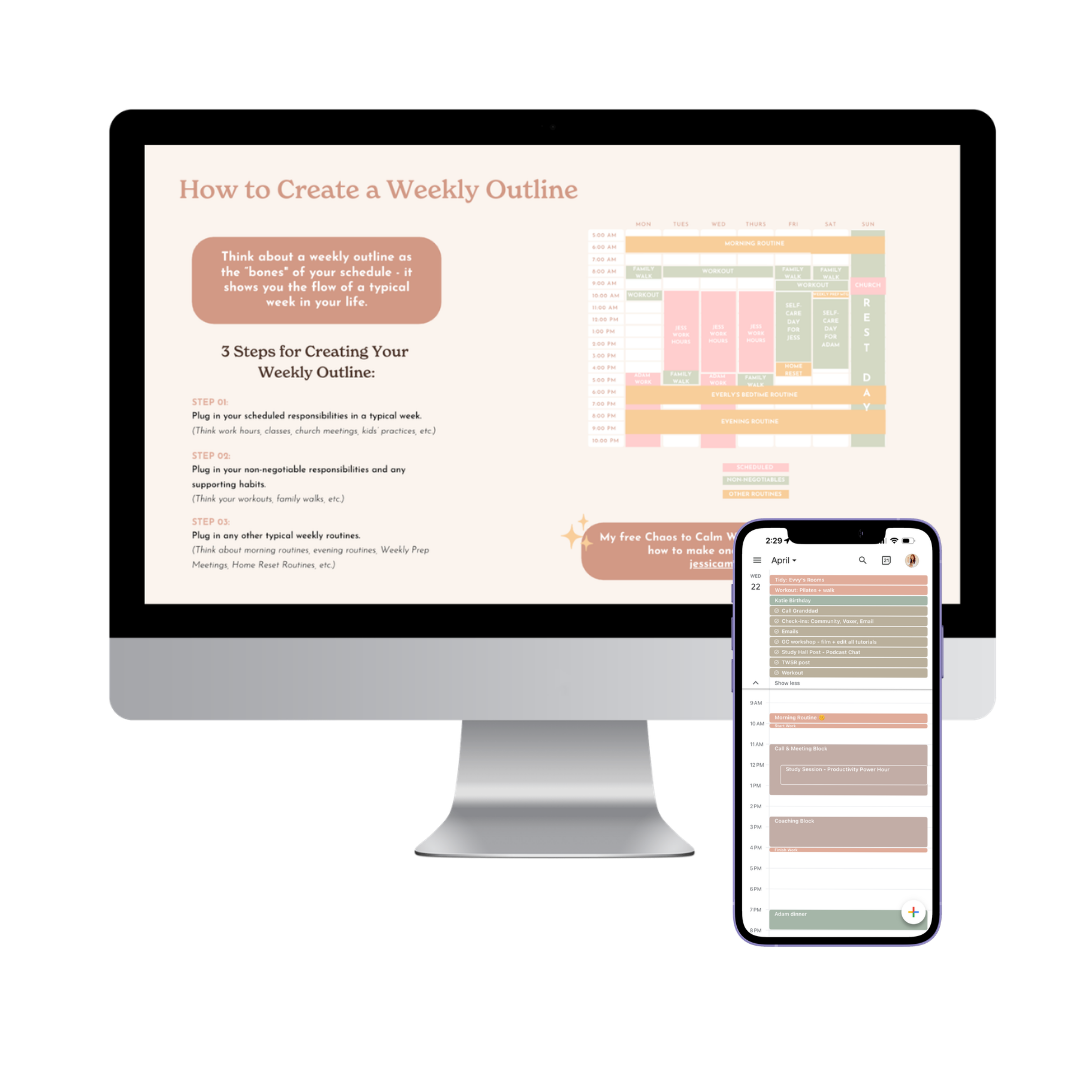
✨ A Weekly Outline to make your weekly planning meetings faster
✨ A clear system for storing recurring tasks and events
✨ So much freed up mental space because you won’t be stressing out about important things falling through the cracks
My Approach (aka why this actually works)
I don’t use Google Calendar as a strict schedule — I use it like digital sticky notes for my life. Inside Google Calendar, I:
✨ Keep track of all of my tasks/events/routines in one place
✨ Have an updated version of my Weekly Outline at all times
✨ Store recurring tasks so I never have to remember them again
✨ Use color-coding so everything is easy to see
This system frees up so much mental space because:
🗓️ You’re not constantly trying to keep track of everything in your head
🗓️ You can actually see what your life requires of you
🗓️ You can easily share your schedule with others
🗓️ You can sit down to plan your weeks with clarity instead of chaos
Imagine…
🗓️ Sitting down to plan your week and everything is already there in front of you
🧠 Not scrambling to remember random tasks
🕊️ Actually feeling calm looking at your schedule
✨ Knowing nothing important is slipping through the cracks
That’s the kind of system we’re building together in this masterclass!
P.S. Did I mention that I taught this Google Cal system to my very type B husband and he’s been successfully using it for over a year?! He was so overwhelmed by trying to keep track of tasks and events in his brain so we built out his Google Cal and now he actually knows what’s coming up, remembers important tasks, and doesn’t feel constantly behind. It’s been a total game-changer for his stress levels…and honestly, for our household too.

The lessons inside this masterclass:
When you sign up for our Google Calendar Masterclass, you’ll get instant access to videos for each lesson. This is a step-by-step, show-you-my-screen style masterclass so you can follow along and actually set everything up.
Lesson 01: How I Use Google Cal
Learn exactly how I use Google Calendar to organize tasks and events for my personal and professional life
Lesson 02: Prepping Your Tasks, Routines, and Events
We’ll map out everything you need to track so nothing falls through the cracks
Lesson 03: Setting Up Your Calendar(s) + Adding Your Routines/Events
Create separate calendars for different areas of your life + plug everything in
Lesson 04: Customizing Your Calendar Colors
Make your calendar feel simple, aesthetic, and easy to understand at a glance
Lesson 05: Setting Up Task List(s) + Adding Your Tasks
Learn how to use Google Tasks for recurring to-dos so your brain doesn’t have to hold them
Lesson 06: Sharing Your Calendar(s) with Others
Perfect for partners, family, or team members so everyone stays on the same page
Lesson 07: Using Google Cal on Your Phone
A quick screensharing tutorial so you can get an idea of how to use Google Cal on your phone
What students are saying about the masterclass:
Frequently Asked Questions
-
The class is ~50 minutes of video content.
-
This is a pre-recorded on-demand class which means you can watch it whenever it’s best for your schedule!
When you sign up, you get immediate access to the class videos. -
This class is housed in a professional, user-friendly learning platform called Kajabi. You will receive an email upon purchase with a link to create and log in to your account. From there, you will have access to all the videos and training materials for life. Kajabi is a web-based platform with app options available.
-
You get lifetime access to the class!
-
This masterclass is designed specifically for Google Calendar, and all of the tutorials walk you step-by-step through setting things up inside that platform.
While the overall concepts around intentional planning can absolutely be applied to other calendar tools like iCal or Outlook, the actual walkthroughs, features, and workflows you’ll see are tailored to Google Calendar only.
-
It might be! This masterclass isn't just about learning the basics of Google Calendar - it's about learning a specific system for using it intentionally.
There's a good chance you're already using Google Cal to track appointments and events, but this class goes deeper than that. Inside, you'll learn how to use it like digital sticky notes for your life, keeping all of your tasks, events, and routines in one place, setting up color-coding so everything is easy to see at a glance, and using Google Tasks for recurring to-dos so your brain doesn't have to hold onto them anymore.
The goal isn't just to use Google Calendar. It's to walk away with a system that frees up mental space so you're not constantly trying to keep track of everything in your head, and you can actually feel calm looking at your schedule.
If you're already on Google Cal but still feel scattered, like things are falling through the cracks, or like your planning sessions feel chaotic, this class was made for you.
-
Nope, they’re different!
In the bonus video inside Hustle Sanely Lifestyle, I give you a behind-the-scenes look at how I use all 3 of my go-to planning tools (Google Calendar, my Peacefully Productive Planner, and Notion) to organize my life as a whole.
Inside the Google Calendar Masterclass, we zoom all the way in on Google Calendar for about 50 minutes. I walk you step-by-step through my exact Google Cal system (how I use it for tasks/events for my personal life, business, and shared planning with my husband) so you can set yours up the same way from start to finish.
-
Because this is a digital product with immediate access, all sales are final and we’re unable to offer returns or refunds.
If you have any questions before purchasing, feel free to reach out! We want you to feel confident that this masterclass is a good fit for you.